Configuration
Configuration splits into what the operator sets at install time and what the admin changes at runtime from the System Setup screen.
1. Install time (operator)
- A TOML config file (
config.toml) bootstraps the first admin account (idempotent). Path via--config/CONFIG_FILE. - Required env:
JWT_SECRET,INGEST_TOKEN,DOC_SIGNING_KEY,DATABASE_URL. Optional:FRONTEND_DIR,SMTP_*,COOKIE_DOMAIN,SINK_HOST,DNS_ZONE. - On AWS these are rendered into the instance from SSM SecureString by userdata — secrets never sit in plaintext.
2. Runtime (admin) — the System Setup screen
Once installed, the admin configures the rest from System Setup
(/installation.html). Changes take effect immediately — no restart.
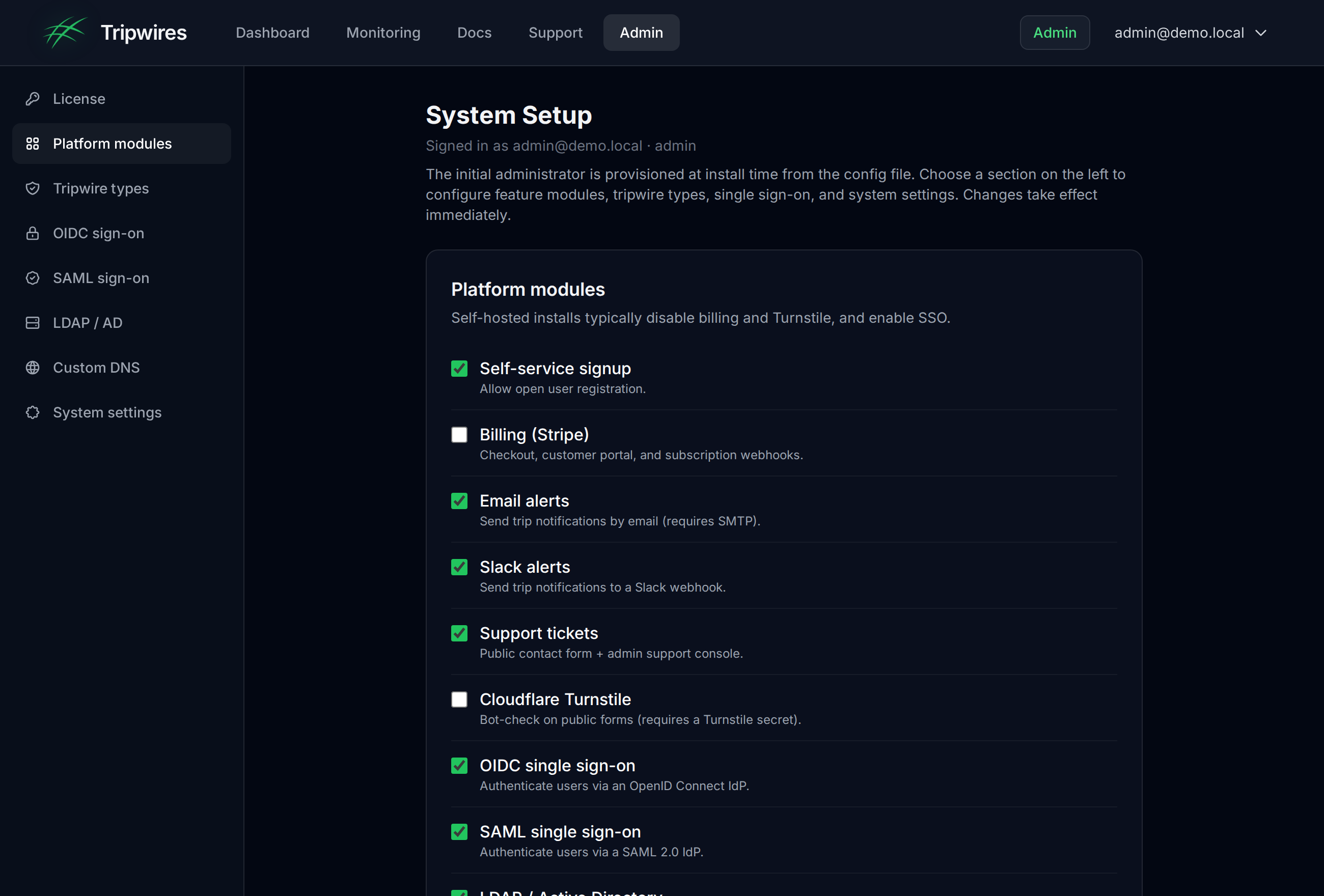
The System Setup screen — platform modules, tripwire-type toggles, OIDC / SAML / LDAP, and DB-backed system settings.
- Platform modules — signup, billing, email / Slack alerts, support, Turnstile, SSO. (Self-host only.)
- Tripwires — a labelled group with per-type toggles: protocol honeypots, canary documents, cloud credentials, execution triggers, QR codes, phishing detection. Disabling a type blocks its creation.
- System settings — DB-backed key/value pairs.
Custom DNS for tripwires
By default a self-hosted server bakes the gettripwires.com sink into new tripwires. Point them at your own DNS so beacons and DNS-token lookups resolve to your sink instead. Configure it in Admin → System Setup → Custom DNS (takes effect immediately, no restart) or via environment variables. Precedence: System Setup config → environment → built-in default.
- Honeypot domain — the base domain (e.g.
canary.acme.example). The beacon host and DNS-token zone derive from it assink.<domain>andd.<domain>. - Sink host (optional override) — the host tracking URLs and document call-homes hit. Point its DNS at your sink / reverse proxy.
- DNS-token zone (optional override) — the zone used for DNS-token hostnames; delegate it with an NS record to your sink’s resolver.
HONEYPOT_DOMAIN=canary.acme.example   # derives sink.<domain> + d.<domain>
SINK_HOST=sink.canary.acme.example    # explicit beacon-host override
DNS_ZONE=d.canary.acme.example        # explicit DNS-token zone override
Only tripwires created after the change use the new DNS; existing tripwires keep the host they were minted with.
Trusted networks (detection whitelist)
Touches from source networks you control — your own vulnerability scanners, monitoring, office ranges — are expected noise. Add them to the whitelist and their touches are ignored: no trip recorded, no alert, so real detections stay high-signal. Configure it in Admin → System Setup → Trusted networks (takes effect immediately) or via the environment. Precedence: System Setup config → environment.
- Entries are CIDR ranges (
10.0.0.0/8) or single IPs (203.0.113.7), IPv4 or IPv6. - The client IP of every detection (protocol honeypots and HTTP/QR beacons, honouring
X-Forwarded-For) is matched against the list. - A malformed entry is skipped, never silently swallowing real detections.
WHITELIST_CIDRS=10.0.0.0/8,192.168.0.0/16,203.0.113.7 # comma / space / newline separatedArtefact storage (central store)
Generated artefacts — canary documents such as Word, Excel, kubeconfig and database dumps — are kept
in one store, chosen with OBJECT_STORE. Downloads are always time-limited links signed by the
control server and served from its own /dl route, so a bucket is never made public or exposed to
the person downloading.
OBJECT_STORE=file(default) — files underOBJECT_STORE_DIR(/var/lib/tripwire/objects). Put it on a persistent volume; the Docker Compose file does.OBJECT_STORE=s3— a central bucket:OBJECT_STORE_BUCKET, optionalOBJECT_STORE_PREFIX(share one bucket between installs) andOBJECT_STORE_REGION. For an on-prem S3-compatible store (MinIO, Ceph RGW, …) setOBJECT_STORE_ENDPOINT(path-style addressing is used) and supplyAWS_ACCESS_KEY_ID/AWS_SECRET_ACCESS_KEY; on EC2 the instance role is used. The server needs onlys3:GetObjectands3:PutObject.
With s3 the bucket is the only store: nothing is read from or
written to local disk. Switching an existing install does not carry over documents already in
OBJECT_STORE_DIR — copy them into the bucket first
(aws s3 sync /var/lib/tripwire/objects s3://<bucket>/<prefix> --exclude '*.meta'),
or their download links stop working. The AWS Terraform module creates the bucket for you — private,
versioned, encrypted, TLS-only — and sets OBJECT_STORE=s3.
Adding users from the console
An admin can add an account from Admin → Users → Add user
(or POST /admin/users): name, email, role (user or admin) and an
initial password. Where the account is created is chosen with USER_DIRECTORY:
USER_DIRECTORY=local(default) — a Tripwire account; the user signs in with their email and password.USER_DIRECTORY=aws-managed-ad— the account is created in AWS Managed Microsoft AD (AWS_DIRECTORY_ID,AWS_DIRECTORY_DOMAIN, optionalAWS_DIRECTORY_REGION) through the Directory Service Data API, and the user signs in with SSO through the IdP federated to that directory. First and last name are required (the IdP's user profile needs both and can't write them back to the directory). The email must be in the directory's domain; the part before@becomes the logon name. Admins are added to the group named byOIDC_ADMIN_ROLE(defaulttripwire-admin), so SSO keeps granting them the admin role. Creation is all-or-nothing: if setting the password or the group fails, the directory account is removed again.
The directory needs Directory Service Data access enabled, and the server role needs
ds-data:CreateUser, DescribeUser, DeleteUser, AddGroupMember
and ds:ResetUserPassword on it. The AWS Terraform module does both when you set
directory.user_provisioning = true. Every add is recorded in the audit log as
user.create; the password is never logged or returned.
Requiring a new password at first sign-in
Add user and Admin → Users → Reset password
both offer Require a new password at first sign-in (on by default). Until the user chooses one, every
call except signing out is refused (403, "code": "password_change_required") and any
sign-in — SSO or password — lands on a Choose a new password page. For a directory account the
new password is written to Active Directory (the same Directory Service Data
call Add user uses), so it is what SSO accepts from then on; a local account's is stored as a hash.
Both the reset and the change are audited (user.password_reset, auth.password_changed).
Note: Active Directory can keep accepting a user's previous password for a short grace period after a
reset — about five minutes on AWS Managed Microsoft AD in our testing (the upper bound is AD's
OldPasswordAllowedPeriod, 60 minutes by default).
Custom webhooks (per-user HTTPS alerts)
Users can send their trip alerts as signed JSON to their own HTTPS endpoint (payload & signature reference). Two control-server environment variables govern it:
NOTIFY_SECRET_KEY— base64 of 32 random bytes (openssl rand -base64 32). Encrypts custom header values and per-user signing secrets at rest (AES-256-GCM). Without it custom webhooks still deliver, but unsigned and without custom headers — set it for any real use. Keep it stable — changing it makes stored headers and secrets unreadable (affected deliveries fail with a clear error until the user re-enters them).WEBHOOK_ALLOW_PRIVATE_NETWORKS=true— allow user webhooks (and Slack/Teams URLs) to reach private addresses (RFC 1918,100.64.0.0/10,fc00::/7), e.g. an internal SOAR. Off by default. Loopback and link-local / cloud-metadata addresses are refused regardless.
The admin switch is System Setup → Platform modules → Custom HTTPS endpoint; turning it off stops deliveries (and queued retries) immediately.
SIEM / SOC forwarding
Forward every detection to your security team's collector, deployment-wide, in addition to per-user Slack/email. Configure it in Admin → System Setup → SIEM forwarding — with presets for Splunk, Microsoft Sentinel, Elastic, Datadog, Sumo Logic and IBM QRadar (takes effect immediately) — or via the environment variables below. Precedence: System Setup config → environment. Two connectors, both optional and best-effort (a slow or absent collector never blocks detection recording):
| Env var | Purpose |
|---|---|
| SIEM_WEBHOOK_URL | POST a structured JSON detection event to this URL (generic webhook / Splunk HEC-style / Sentinel / Elastic) |
| SIEM_SYSLOG_ADDR | host:port of a syslog collector — sends an ArcSight CEF message (Splunk, QRadar, Sentinel, ArcSight) |
| SIEM_SYSLOG_PROTO | udp (default) or tcp |
| SIEM_SYSLOG_TAG | syslog tag (default tripwire) |
Example CEF line:
CEF:0|Levantar|Tripwire|1.0|tripwire-triggered|Tripwire decoy triggered|8|externalId=tw1 cs1Label=TripwireName cs1=prod-db src=8.8.8.8 app=postgres rt=2026-06-02T00:00:00ZVerify it with the mock SOC collector
A dependency-free mock collector ships in
deploy/siem-mock/ — it listens for the CEF syslog and JSON webhook and
prints each detection, so you can confirm forwarding end-to-end before wiring your
real SIEM:
# 1. run the mock collector
node deploy/siem-mock/siem-mock.mjs

# 2. point the control server at it
SIEM_WEBHOOK_URL=http://<host>:8088/ingest
SIEM_SYSLOG_ADDR=<host>:5514

# 3. trip a decoy — both a CEF line and a JSON event arrive at the collectorSCIM 2.0 provisioning (directory integration)
Let an identity provider (Entra ID, Okta, …) push user and
group lifecycle into Tripwire — the companion to SSO. It automates the
leaver case (deprovision on offboard) and syncs
AD/IdP security groups → roles. Point your IdP's SCIM
connector at https://<host>/scim/v2 with a bearer token.
| Env var | Purpose |
|---|---|
| SCIM_TOKEN | enables /scim/v2; the IdP authenticates with this bearer token |
| SCIM_GROUP_ROLE_MAP | group→role map, keyed by the IdP's stable group externalId (recommended) or display name, e.g. Tripwire Admins=admin,SOC=admin — a user in a mapped group gets that role (the AD-group sync) |
| SCIM_PROTECTED_USERS | comma-separated usernames/emails SCIM may never modify or disable (break-glass / local admins). The bootstrap admin is protected automatically — guards against IdP-driven lockout. |
| SCIM_DEFAULT_TIER | subscription tier stamped on provisioned accounts (default enterprise) |
Supported: Users (create / get / list / replace / active toggle / delete)
and Groups (create / get / list / member PATCH / delete) with pagination, plus
ServiceProviderConfig. A leaver (active:false or DELETE) disables the
account rather than hard-deleting it, preserving the audit trail. Every SCIM mutation is
written to the audit log (actor scim).
Verify end-to-end with the bundled mock IdP (joiner → AD-group sync → leaver):
SCIM_TOKEN=<token> ./deploy/scim-mock/provision.sh alice@corp.exampleFeature toggles — what applies where
- Tripwire-type toggles apply to both the SaaS and self-host. The SaaS keeps every implemented type on; a self-hosted admin configures them per installation.
- Platform modules (billing / SSO / alerts / support) are self-host only; the SaaS gates those by subscription tier.
- Gating lives in the composition root / shim, never in shared
coreuse cases — so the two deployments can't bleed into each other.
SAML 2.0 single sign-on
Enable the sso_saml module, then fill in the SAML 2.0 SSO section of System Setup. The control server is a SAML service provider (SP) that initiates login, verifies the IdP's signed assertion (signature, audience, destination, InResponseTo and validity window) and issues the normal session — the same path as OIDC and LDAP. Works with Keycloak, ADFS, Azure AD, Okta and any SAML 2.0 IdP.
- IdP Metadata URL — the IdP's SAML descriptor (e.g. Keycloak
/realms/<realm>/protocol/saml/descriptor). Supplies the SSO endpoint and signing certificate. - Service Provider Entity ID — typically this server's metadata URL,
https://your-host/auth/saml/metadata. - ACS URL —
https://your-host/auth/saml/acs(must match exactly; the assertion's Destination is checked against it). - IdP Certificate — optional. The metadata URL normally provides it; paste one to pin or to cover a rotation.
Register this server with your IdP using its published SP metadata:
GET https://your-host/auth/saml/metadata   # SP descriptor (entity id, ACS, SP cert)
GET https://your-host/auth/saml/login      # start SP-initiated login
POST https://your-host/auth/saml/acs       # IdP posts the signed assertion here
Optional environment variables (also seedable instead of System Setup):
SAML_IDP_METADATA_URL=...   # enables sso_saml + sets the IdP metadata URL
SAML_ENTITY_ID, SAML_ACS_URL
SAML_IDP_CERT               # optional PEM to pin the IdP signing cert (metadata normally supplies it)
SAML_SP_KEY, SAML_SP_CERT   # SP signing keypair (PEM); ephemeral if unset
SAML_ADMIN_ROLE=tripwire-admin   # group/role value that grants the admin role
An assertion's email attribute (or an email-format NameID) identifies the user; a groups/memberOf/role attribute matching SAML_ADMIN_ROLE grants admin. Set SAML_SP_KEY/SAML_SP_CERT in production so the published SP metadata is stable across restarts.
Observability — health probes & metrics
The control server exposes operational endpoints for your platform team (the SaaS reports to CloudWatch; on-prem scrapes these directly). No configuration is required.
GET /healthz— liveness. Returns200 okas long as the process is up.GET /readyz— readiness. Returns200 readyonly when the database is reachable, otherwise503. The Docker image wires this as itsHEALTHCHECK; point your k8s readiness probe at it too.GET /metrics— Prometheus text exposition:tripwire_http_requests_total(by method/code),tripwire_trips_detected_total,tripwire_notifications_sent_total(by result), plustripwire_database_up,tripwire_uptime_seconds,go_goroutinesandtripwire_build_info.
Metrics expose aggregate counts only (no secrets). To require authentication when exposing /metrics beyond your network, set METRICS_TOKEN and have Prometheus send Authorization: Bearer <token>.
scrape_configs:
  - job_name: tripwire
    metrics_path: /metrics
    static_configs:
      - targets: ["your-host:8080"]
    # authorization:           # only if METRICS_TOKEN is set
    #   credentials: <token>
Air-gapped / zero-egress build
The admin UI served by the on-prem control server makes no third-party requests — it is safe for air-gapped and privacy-sensitive deployments. The SaaS build keeps these integrations; only the self-host image is stripped, at image-build time, by deploy/strip-egress.sh.
- Removed entirely: product analytics, the Termly cookie banner, Google Fonts (the UI falls back to the system font stack), and Stripe (billing is disabled on self-host).
- Vendored locally: syntax highlighting (highlight.js) and the technology logos are served from
/assets/vendor/inside the image instead of a CDN. - Turnstile: the CAPTCHA loader is replaced by a local no-op stub. The server already skips Turnstile verification unless
TURNSTILE_SECRETis set, so forms work unchanged.
No configuration is required — the stock image is zero-egress by default. To confirm, watch the browser network tab on any page: every request stays on the control server's own origin.